
logo
Exam overview and study plan

NSE 5 - FortiSASE and SD-WAN 7.6 Core Administrator Practice Questions

Fortinet NSE 5 - FortiSASE and SD-WAN 7.6 Core Administrator

Read questions, check verified answers and discuss the reasoning. Use reading options to shape your revision, or switch to the simulator for timed practice.

View 28 free questions

28 questions in this view

Page 1 of 5

Question 1

Which three authentication sources support secure identity verification and access control for FortiSASE remote users? (Choose three.)

Select an answer above, then submit your vote. Reading or practicing does not cast a vote.

Question 2

Which configuration is a valid use case for FortiSASE features in supporting remote users?

Select an answer above, then submit your vote. Reading or practicing does not cast a vote.

Question 3

What can be configured on FortiSASE as an additional layer of security for FortiClient registration?

Select an answer above, then submit your vote. Reading or practicing does not cast a vote.

Question 4

Which three FortiSASE use cases are possible? (Choose three.)

Select an answer above, then submit your vote. Reading or practicing does not cast a vote.

Question 5

Refer to the exhibit.

The SD-WAN rule status and configuration is shown.

Based on the exhibit, which change in the measured latency will first make HUB1-VPN3 the new preferred member?
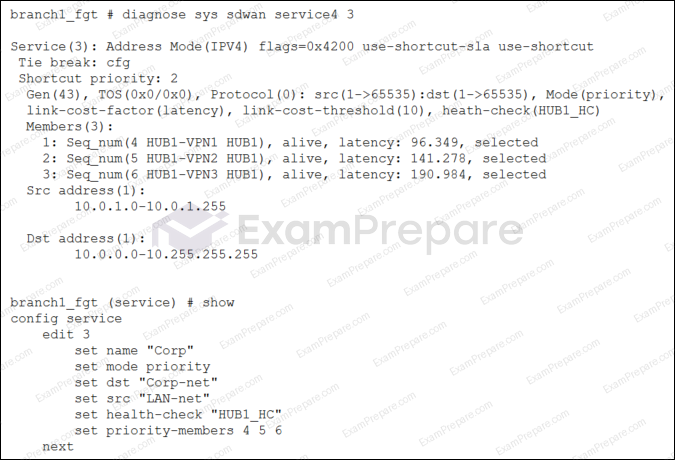
SD-WAN rule status and configuration

Select an answer above, then submit your vote. Reading or practicing does not cast a vote.

Question 6

In which order does a FortiGate device consider the following elements shown in the left column during the route lookup process?

Select the element in the left column, hold and drag it to a blank position in the column on the right. Place the four correct elements in order, placing the first element in the first position at the top of the column. Once you place an element, you can move it again if you want to change your answer before moving to the next question. You need to drop four elements in the work area.

Select and drag the screen divider to change the viewable area of the source and work areas.
Route Lookup Process
A
B
C
D