
logo
Exam overview and study plan

AZ-120 Practice Questions

Azure for SAP Workloads Specialty

Read questions, check verified answers and discuss the reasoning. Use reading options to shape your revision, or switch to the simulator for timed practice.

View 111 free questions

111 questions in this view

Page 1 of 19

Question 1

Overview

Contoso, Ltd. is a manufacturing company that has 15,000 employees.

The company uses SAP for sales and manufacturing.

Contoso has sales offices in New York and London and manufacturing facilities in Boston and Seattle.

Existing Environment

Active Directory

The network contains an on-premises Active Directory domain named ad.contoso.com. User email addresses use a domain name of contoso.com.

SAP Environment

The current SAP environment contains the following components.

  • SAP Solution Manager
  • SAP ERP Central Component (SAP ECC)
  • SAP Supply Chain Management (SAP SCM)
  • SAP application servers that run Windows Server 2008 R2
  • SAP HANA database servers that run SUSE Linux Enterprise Server 12 (SLES 12)

Problem Statements

Contoso identifies the following issues in its current environment:

  • The SAP HANA environment lacks adequate resources.
  • The Windows servers are nearing the end of support.
  • The datacenters are at maximum capacity.

Requirements

Planned Changes

Contoso identifies the following planned changes:

  • Deploy Azure Virtual WAN.
  • Migrate the application servers to Windows Server 2022.
  • Deploy ExpressRoute connections to all the offices and manufacturing facilities.
  • Deploy SAP landscapes to Azure for development, quality assurance, and production.

All resources for the production landscape will be in a resource group named SAPProduction.

Business goals

Contoso identifies the following business goals:

  • Minimize costs whenever possible.
  • Migrate SAP to Azure without causing downtime.
  • Ensure that all SAP deployments to Azure are supported by SAP.
  • Ensure that all the production databases can withstand the failure of an Azure region.
  • Ensure that all the production application servers can restore daily backups from the last 21 days.

Technical Requirements

Contoso identifies the following technical requirements:

  • Inspect all web queries.
  • Deploy an SAP HANA cluster to two datacenters.
  • Minimize the bandwidth used for database synchronization.
  • Use Active Directory accounts to administer Azure resources.
  • Ensure that each production application server has four 1 TB data disks.
  • Ensure that an application server can be restored from a backup created during the last five days within 15 minutes.
  • Implement an approval process to ensure that an SAP administrator is notified before another administrator makes changes to the Azure virtual machines that host SAP.

The bandwidth between Azure and the New York office needs to allow for 1 Gbps throughput, with occasional bursts of up to 3 Gbps.

Proposed Backup Policy

An Azure administrator proposes the backup policy shown in the following exhibit.
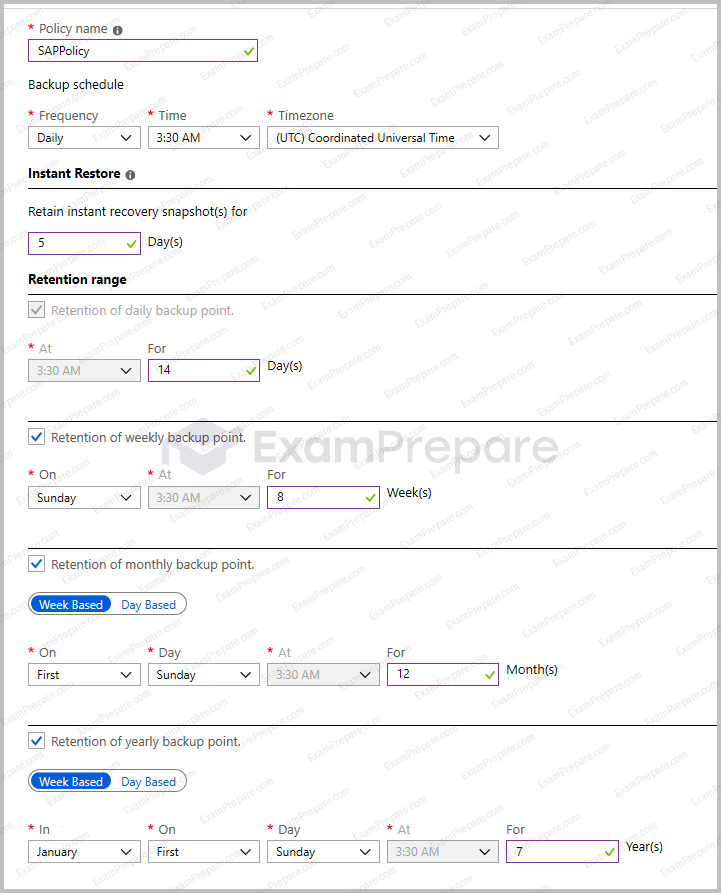
Policy name: SAPPolicy
Backup schedule: Daily at 3:30 AM (UTC) Coordinated Universal Time
Instant Restore
Retain instant recovery snapshot(s) for: 5 days
Retention Range
Retention of daily backup point: enabled at 3:30 AM for 14 days
Retention of weekly backup point: enabled on Sunday at 3:30 AM for 8 weeks
Retention of monthly backup point: enabled week based on first Sunday at 3:30 AM for 12 months
Retention of yearly backup point: enabled week based in January on first Sunday at 3:30 AM for 7 years

Azure Resource Manager Template

An Azure administrator provides you with the Azure Resource Manager template that will be used to provision the production application servers.

{

    "apiVersion": "2019-07-01",

    "type": "Microsoft.Compute/virtualMachines",

    "name": "[parameters('vmname')]",

    "location": "EastUS",

    "dependsOn": [

      "[resourceId('Microsoft.Network/networkInterfaces/', parameters('vmname'))]"

    ],

    "properties": {

      "hardwareProfile": {

        "vmSize": "[parameters('vmSize')]"

      },

      "osProfile": {

        "computerName": "[parameters('vmname')]",

        "adminUsername": "[parameters('adminUsername')]",

        "adminPassword": "[parameters('adminPassword')]"

      },

      "storageProfile": {

        "ImageReference": {

          "publisher": "MicrosoftWindowsServer",

          "Offer" : "WindowsServer",

          "sku" : "2022-datacenter",

          "version" : "latest"

        },

        "osDisk": {

          "name": "[concat(parameters('vmname'), '-OS')]",

          "caching": "ReadWrite",

          "createOption": "FromImage",

          "diskSizeGB": 128,

          "managedDisk":{

              "storageAccountType": "[paramters('storageAccountType')]"

          }

        },

        "copy": [

          {

            "name": "DataDisks",

            "count": "[parameters('diskCount')]",

            "input" : {

              "Caching" : "None",

              "diskSizeGB" : 1024,

              "lun": "[copyIndex('datadisks')]",

              "name": "[concat(parameters('vmname'), '-DD',copyIndex('datadisks'))]",

              "createOption": "Empty"

            }

          }

        ]

      },

      "networkProfile": {

        "networkInterfaces": [

          {

            "id": "[resourceId('Microsoft.Network/networkInterfaces', parameters(‘vmName’))]"

          }

        ]

      }

    },

    "resources": [

        {

            "apiVersion": "2019-07-01",

            "type": "Microsoft.Compute/virtualMachines/extensions",

            "name": "[concat(parameters('VMName'), '/joindomain')]",

            "location": "eastus",

            "properties": {

              "publisher": "Microsoft.Compute",

              "type": "JsonADDomainExtension",

              "typeHandlerVersion": "1.3",

              "autoUpgradeMinorVersion": true,

              "settings": {

                "Name": "[parameters('domainName')]",

                "User": "[parameters('domainusername')]",

                "Restart": "true",

                "Options": "3"

              },

              "protectedsettings": {

                "Password": "[parameters('domainPassword')]"

          }

        }

      }

  ]     

}
Once the migration completes, to which size should you set the ExpressRoute circuit to the New York office to meet the business goals and technical requirements?

Select an answer above, then submit your vote. Reading or practicing does not cast a vote.

Question 2

Overview

Contoso, Ltd. is a manufacturing company that has 15,000 employees.

The company uses SAP for sales and manufacturing.

Contoso has sales offices in New York and London and manufacturing facilities in Boston and Seattle.

Existing Environment

Active Directory

The network contains an on-premises Active Directory domain named ad.contoso.com. User email addresses use a domain name of contoso.com.

SAP Environment

The current SAP environment contains the following components.

  • SAP Solution Manager
  • SAP ERP Central Component (SAP ECC)
  • SAP Supply Chain Management (SAP SCM)
  • SAP application servers that run Windows Server 2008 R2
  • SAP HANA database servers that run SUSE Linux Enterprise Server 12 (SLES 12)

Problem Statements

Contoso identifies the following issues in its current environment:

  • The SAP HANA environment lacks adequate resources.
  • The Windows servers are nearing the end of support.
  • The datacenters are at maximum capacity.

Requirements

Planned Changes

Contoso identifies the following planned changes:

  • Deploy Azure Virtual WAN.
  • Migrate the application servers to Windows Server 2022.
  • Deploy ExpressRoute connections to all the offices and manufacturing facilities.
  • Deploy SAP landscapes to Azure for development, quality assurance, and production.

All resources for the production landscape will be in a resource group named SAPProduction.

Business goals

Contoso identifies the following business goals:

  • Minimize costs whenever possible.
  • Migrate SAP to Azure without causing downtime.
  • Ensure that all SAP deployments to Azure are supported by SAP.
  • Ensure that all the production databases can withstand the failure of an Azure region.
  • Ensure that all the production application servers can restore daily backups from the last 21 days.

Technical Requirements

Contoso identifies the following technical requirements:

  • Inspect all web queries.
  • Deploy an SAP HANA cluster to two datacenters.
  • Minimize the bandwidth used for database synchronization.
  • Use Active Directory accounts to administer Azure resources.
  • Ensure that each production application server has four 1 TB data disks.
  • Ensure that an application server can be restored from a backup created during the last five days within 15 minutes.
  • Implement an approval process to ensure that an SAP administrator is notified before another administrator makes changes to the Azure virtual machines that host SAP.

The bandwidth between Azure and the New York office needs to allow for 1 Gbps throughput, with occasional bursts of up to 3 Gbps.

Proposed Backup Policy

An Azure administrator proposes the backup policy shown in the following exhibit.

Policy name: SAPPolicy
Backup schedule: Daily at 3:30 AM (UTC) Coordinated Universal Time
Instant Restore
Retain instant recovery snapshot(s) for: 5 days
Retention Range
Retention of daily backup point: enabled at 3:30 AM for 14 days
Retention of weekly backup point: enabled on Sunday at 3:30 AM for 8 weeks
Retention of monthly backup point: enabled week based on first Sunday at 3:30 AM for 12 months
Retention of yearly backup point: enabled week based in January on first Sunday at 3:30 AM for 7 years

Azure Resource Manager Template

An Azure administrator provides you with the Azure Resource Manager template that will be used to provision the production application servers.

{

    "apiVersion": "2019-07-01",

    "type": "Microsoft.Compute/virtualMachines",

    "name": "[parameters('vmname')]",

    "location": "EastUS",

    "dependsOn": [

      "[resourceId('Microsoft.Network/networkInterfaces/', parameters('vmname'))]"

    ],

    "properties": {

      "hardwareProfile": {

        "vmSize": "[parameters('vmSize')]"

      },

      "osProfile": {

        "computerName": "[parameters('vmname')]",

        "adminUsername": "[parameters('adminUsername')]",

        "adminPassword": "[parameters('adminPassword')]"

      },

      "storageProfile": {

        "ImageReference": {

          "publisher": "MicrosoftWindowsServer",

          "Offer" : "WindowsServer",

          "sku" : "2022-datacenter",

          "version" : "latest"

        },

        "osDisk": {

          "name": "[concat(parameters('vmname'), '-OS')]",

          "caching": "ReadWrite",

          "createOption": "FromImage",

          "diskSizeGB": 128,

          "managedDisk":{

              "storageAccountType": "[paramters('storageAccountType')]"

          }

        },

        "copy": [

          {

            "name": "DataDisks",

            "count": "[parameters('diskCount')]",

            "input" : {

              "Caching" : "None",

              "diskSizeGB" : 1024,

              "lun": "[copyIndex('datadisks')]",

              "name": "[concat(parameters('vmname'), '-DD',copyIndex('datadisks'))]",

              "createOption": "Empty"

            }

          }

        ]

      },

      "networkProfile": {

        "networkInterfaces": [

          {

            "id": "[resourceId('Microsoft.Network/networkInterfaces', parameters(‘vmName’))]"

          }

        ]

      }

    },

    "resources": [

        {

            "apiVersion": "2019-07-01",

            "type": "Microsoft.Compute/virtualMachines/extensions",

            "name": "[concat(parameters('VMName'), '/joindomain')]",

            "location": "eastus",

            "properties": {

              "publisher": "Microsoft.Compute",

              "type": "JsonADDomainExtension",

              "typeHandlerVersion": "1.3",

              "autoUpgradeMinorVersion": true,

              "settings": {

                "Name": "[parameters('domainName')]",

                "User": "[parameters('domainusername')]",

                "Restart": "true",

                "Options": "3"

              },

              "protectedsettings": {

                "Password": "[parameters('domainPassword')]"

          }

        }

      }

  ]     

}

You need to provide the Azure administrator with the values to complete the Azure Resource Manager template.


Which values should you provide for diskCount, StorageAccountType, and domainName? To answer, select the appropriate options in the answer area.


NOTE: Each correct selection is worth one point.
diskCount:
storageAccountType:
domainName:

Question 3

Overview

Contoso, Ltd. is a manufacturing company that has 15,000 employees.

The company uses SAP for sales and manufacturing.

Contoso has sales offices in New York and London and manufacturing facilities in Boston and Seattle.

Existing Environment

Active Directory

The network contains an on-premises Active Directory domain named ad.contoso.com. User email addresses use a domain name of contoso.com.

SAP Environment

The current SAP environment contains the following components.

  • SAP Solution Manager
  • SAP ERP Central Component (SAP ECC)
  • SAP Supply Chain Management (SAP SCM)
  • SAP application servers that run Windows Server 2008 R2
  • SAP HANA database servers that run SUSE Linux Enterprise Server 12 (SLES 12)

Problem Statements

Contoso identifies the following issues in its current environment:

  • The SAP HANA environment lacks adequate resources.
  • The Windows servers are nearing the end of support.
  • The datacenters are at maximum capacity.

Requirements

Planned Changes

Contoso identifies the following planned changes:

  • Deploy Azure Virtual WAN.
  • Migrate the application servers to Windows Server 2022.
  • Deploy ExpressRoute connections to all the offices and manufacturing facilities.
  • Deploy SAP landscapes to Azure for development, quality assurance, and production.

All resources for the production landscape will be in a resource group named SAPProduction.

Business goals

Contoso identifies the following business goals:

  • Minimize costs whenever possible.
  • Migrate SAP to Azure without causing downtime.
  • Ensure that all SAP deployments to Azure are supported by SAP.
  • Ensure that all the production databases can withstand the failure of an Azure region.
  • Ensure that all the production application servers can restore daily backups from the last 21 days.

Technical Requirements

Contoso identifies the following technical requirements:

  • Inspect all web queries.
  • Deploy an SAP HANA cluster to two datacenters.
  • Minimize the bandwidth used for database synchronization.
  • Use Active Directory accounts to administer Azure resources.
  • Ensure that each production application server has four 1 TB data disks.
  • Ensure that an application server can be restored from a backup created during the last five days within 15 minutes.
  • Implement an approval process to ensure that an SAP administrator is notified before another administrator makes changes to the Azure virtual machines that host SAP.

The bandwidth between Azure and the New York office needs to allow for 1 Gbps throughput, with occasional bursts of up to 3 Gbps.

Proposed Backup Policy

An Azure administrator proposes the backup policy shown in the following exhibit.

Policy name: SAPPolicy
Backup schedule: Daily at 3:30 AM (UTC) Coordinated Universal Time
Instant Restore
Retain instant recovery snapshot(s) for: 5 days
Retention Range
Retention of daily backup point: enabled at 3:30 AM for 14 days
Retention of weekly backup point: enabled on Sunday at 3:30 AM for 8 weeks
Retention of monthly backup point: enabled week based on first Sunday at 3:30 AM for 12 months
Retention of yearly backup point: enabled week based in January on first Sunday at 3:30 AM for 7 years

Azure Resource Manager Template

An Azure administrator provides you with the Azure Resource Manager template that will be used to provision the production application servers.

{

    "apiVersion": "2019-07-01",

    "type": "Microsoft.Compute/virtualMachines",

    "name": "[parameters('vmname')]",

    "location": "EastUS",

    "dependsOn": [

      "[resourceId('Microsoft.Network/networkInterfaces/', parameters('vmname'))]"

    ],

    "properties": {

      "hardwareProfile": {

        "vmSize": "[parameters('vmSize')]"

      },

      "osProfile": {

        "computerName": "[parameters('vmname')]",

        "adminUsername": "[parameters('adminUsername')]",

        "adminPassword": "[parameters('adminPassword')]"

      },

      "storageProfile": {

        "ImageReference": {

          "publisher": "MicrosoftWindowsServer",

          "Offer" : "WindowsServer",

          "sku" : "2022-datacenter",

          "version" : "latest"

        },

        "osDisk": {

          "name": "[concat(parameters('vmname'), '-OS')]",

          "caching": "ReadWrite",

          "createOption": "FromImage",

          "diskSizeGB": 128,

          "managedDisk":{

              "storageAccountType": "[paramters('storageAccountType')]"

          }

        },

        "copy": [

          {

            "name": "DataDisks",

            "count": "[parameters('diskCount')]",

            "input" : {

              "Caching" : "None",

              "diskSizeGB" : 1024,

              "lun": "[copyIndex('datadisks')]",

              "name": "[concat(parameters('vmname'), '-DD',copyIndex('datadisks'))]",

              "createOption": "Empty"

            }

          }

        ]

      },

      "networkProfile": {

        "networkInterfaces": [

          {

            "id": "[resourceId('Microsoft.Network/networkInterfaces', parameters(‘vmName’))]"

          }

        ]

      }

    },

    "resources": [

        {

            "apiVersion": "2019-07-01",

            "type": "Microsoft.Compute/virtualMachines/extensions",

            "name": "[concat(parameters('VMName'), '/joindomain')]",

            "location": "eastus",

            "properties": {

              "publisher": "Microsoft.Compute",

              "type": "JsonADDomainExtension",

              "typeHandlerVersion": "1.3",

              "autoUpgradeMinorVersion": true,

              "settings": {

                "Name": "[parameters('domainName')]",

                "User": "[parameters('domainusername')]",

                "Restart": "true",

                "Options": "3"

              },

              "protectedsettings": {

                "Password": "[parameters('domainPassword')]"

          }

        }

      }

  ]     

}

You are planning replication of the SAP HANA database for the disaster recovery environment in Azure.


For each of the following statements, select Yes if the statement is true. Otherwise, select No.


NOTE: Each correct selection is worth one point.

Answer Area
StatementsYesNo

You must use synchronous replication.

You must use delta data shipping for operation mode.

You must configure a Microsoft Entra application to manage the failover.

Question 4

Overview

Contoso, Ltd. is a manufacturing company that has 15,000 employees.

The company uses SAP for sales and manufacturing.

Contoso has sales offices in New York and London and manufacturing facilities in Boston and Seattle.

Existing Environment

Active Directory

The network contains an on-premises Active Directory domain named ad.contoso.com. User email addresses use a domain name of contoso.com.

SAP Environment

The current SAP environment contains the following components.

  • SAP Solution Manager
  • SAP ERP Central Component (SAP ECC)
  • SAP Supply Chain Management (SAP SCM)
  • SAP application servers that run Windows Server 2008 R2
  • SAP HANA database servers that run SUSE Linux Enterprise Server 12 (SLES 12)

Problem Statements

Contoso identifies the following issues in its current environment:

  • The SAP HANA environment lacks adequate resources.
  • The Windows servers are nearing the end of support.
  • The datacenters are at maximum capacity.

Requirements

Planned Changes

Contoso identifies the following planned changes:

  • Deploy Azure Virtual WAN.
  • Migrate the application servers to Windows Server 2022.
  • Deploy ExpressRoute connections to all the offices and manufacturing facilities.
  • Deploy SAP landscapes to Azure for development, quality assurance, and production.

All resources for the production landscape will be in a resource group named SAPProduction.

Business goals

Contoso identifies the following business goals:

  • Minimize costs whenever possible.
  • Migrate SAP to Azure without causing downtime.
  • Ensure that all SAP deployments to Azure are supported by SAP.
  • Ensure that all the production databases can withstand the failure of an Azure region.
  • Ensure that all the production application servers can restore daily backups from the last 21 days.

Technical Requirements

Contoso identifies the following technical requirements:

  • Inspect all web queries.
  • Deploy an SAP HANA cluster to two datacenters.
  • Minimize the bandwidth used for database synchronization.
  • Use Active Directory accounts to administer Azure resources.
  • Ensure that each production application server has four 1 TB data disks.
  • Ensure that an application server can be restored from a backup created during the last five days within 15 minutes.
  • Implement an approval process to ensure that an SAP administrator is notified before another administrator makes changes to the Azure virtual machines that host SAP.

The bandwidth between Azure and the New York office needs to allow for 1 Gbps throughput, with occasional bursts of up to 3 Gbps.

Proposed Backup Policy

An Azure administrator proposes the backup policy shown in the following exhibit.

Policy name: SAPPolicy
Backup schedule: Daily at 3:30 AM (UTC) Coordinated Universal Time
Instant Restore
Retain instant recovery snapshot(s) for: 5 days
Retention Range
Retention of daily backup point: enabled at 3:30 AM for 14 days
Retention of weekly backup point: enabled on Sunday at 3:30 AM for 8 weeks
Retention of monthly backup point: enabled week based on first Sunday at 3:30 AM for 12 months
Retention of yearly backup point: enabled week based in January on first Sunday at 3:30 AM for 7 years

Azure Resource Manager Template

An Azure administrator provides you with the Azure Resource Manager template that will be used to provision the production application servers.

{

    "apiVersion": "2019-07-01",

    "type": "Microsoft.Compute/virtualMachines",

    "name": "[parameters('vmname')]",

    "location": "EastUS",

    "dependsOn": [

      "[resourceId('Microsoft.Network/networkInterfaces/', parameters('vmname'))]"

    ],

    "properties": {

      "hardwareProfile": {

        "vmSize": "[parameters('vmSize')]"

      },

      "osProfile": {

        "computerName": "[parameters('vmname')]",

        "adminUsername": "[parameters('adminUsername')]",

        "adminPassword": "[parameters('adminPassword')]"

      },

      "storageProfile": {

        "ImageReference": {

          "publisher": "MicrosoftWindowsServer",

          "Offer" : "WindowsServer",

          "sku" : "2022-datacenter",

          "version" : "latest"

        },

        "osDisk": {

          "name": "[concat(parameters('vmname'), '-OS')]",

          "caching": "ReadWrite",

          "createOption": "FromImage",

          "diskSizeGB": 128,

          "managedDisk":{

              "storageAccountType": "[paramters('storageAccountType')]"

          }

        },

        "copy": [

          {

            "name": "DataDisks",

            "count": "[parameters('diskCount')]",

            "input" : {

              "Caching" : "None",

              "diskSizeGB" : 1024,

              "lun": "[copyIndex('datadisks')]",

              "name": "[concat(parameters('vmname'), '-DD',copyIndex('datadisks'))]",

              "createOption": "Empty"

            }

          }

        ]

      },

      "networkProfile": {

        "networkInterfaces": [

          {

            "id": "[resourceId('Microsoft.Network/networkInterfaces', parameters(‘vmName’))]"

          }

        ]

      }

    },

    "resources": [

        {

            "apiVersion": "2019-07-01",

            "type": "Microsoft.Compute/virtualMachines/extensions",

            "name": "[concat(parameters('VMName'), '/joindomain')]",

            "location": "eastus",

            "properties": {

              "publisher": "Microsoft.Compute",

              "type": "JsonADDomainExtension",

              "typeHandlerVersion": "1.3",

              "autoUpgradeMinorVersion": true,

              "settings": {

                "Name": "[parameters('domainName')]",

                "User": "[parameters('domainusername')]",

                "Restart": "true",

                "Options": "3"

              },

              "protectedsettings": {

                "Password": "[parameters('domainPassword')]"

          }

        }

      }

  ]     

}

You are evaluating the proposed backup policy.


For each of the following statements, select Yes if the statement is true. Otherwise, select No.


NOTE: Each correct selection is worth one point.
Answer Area
StatementsYesNo

The backup policy meets the technical requirements.

The backup policy meets the business requirements.

If the backup policy is implemented, a file backed up on the first Sunday of a month can be restored one year after the file was deleted.

Question 5

Overview

Contoso, Ltd. is a manufacturing company that has 15,000 employees.

The company uses SAP for sales and manufacturing.

Contoso has sales offices in New York and London and manufacturing facilities in Boston and Seattle.

Existing Environment

Active Directory

The network contains an on-premises Active Directory domain named ad.contoso.com. User email addresses use a domain name of contoso.com.

SAP Environment

The current SAP environment contains the following components.

  • SAP Solution Manager
  • SAP ERP Central Component (SAP ECC)
  • SAP Supply Chain Management (SAP SCM)
  • SAP application servers that run Windows Server 2008 R2
  • SAP HANA database servers that run SUSE Linux Enterprise Server 12 (SLES 12)

Problem Statements

Contoso identifies the following issues in its current environment:

  • The SAP HANA environment lacks adequate resources.
  • The Windows servers are nearing the end of support.
  • The datacenters are at maximum capacity.

Requirements

Planned Changes

Contoso identifies the following planned changes:

  • Deploy Azure Virtual WAN.
  • Migrate the application servers to Windows Server 2022.
  • Deploy ExpressRoute connections to all the offices and manufacturing facilities.
  • Deploy SAP landscapes to Azure for development, quality assurance, and production.

All resources for the production landscape will be in a resource group named SAPProduction.

Business goals

Contoso identifies the following business goals:

  • Minimize costs whenever possible.
  • Migrate SAP to Azure without causing downtime.
  • Ensure that all SAP deployments to Azure are supported by SAP.
  • Ensure that all the production databases can withstand the failure of an Azure region.
  • Ensure that all the production application servers can restore daily backups from the last 21 days.

Technical Requirements

Contoso identifies the following technical requirements:

  • Inspect all web queries.
  • Deploy an SAP HANA cluster to two datacenters.
  • Minimize the bandwidth used for database synchronization.
  • Use Active Directory accounts to administer Azure resources.
  • Ensure that each production application server has four 1 TB data disks.
  • Ensure that an application server can be restored from a backup created during the last five days within 15 minutes.
  • Implement an approval process to ensure that an SAP administrator is notified before another administrator makes changes to the Azure virtual machines that host SAP.

The bandwidth between Azure and the New York office needs to allow for 1 Gbps throughput, with occasional bursts of up to 3 Gbps.

Proposed Backup Policy

An Azure administrator proposes the backup policy shown in the following exhibit.

Policy name: SAPPolicy
Backup schedule: Daily at 3:30 AM (UTC) Coordinated Universal Time
Instant Restore
Retain instant recovery snapshot(s) for: 5 days
Retention Range
Retention of daily backup point: enabled at 3:30 AM for 14 days
Retention of weekly backup point: enabled on Sunday at 3:30 AM for 8 weeks
Retention of monthly backup point: enabled week based on first Sunday at 3:30 AM for 12 months
Retention of yearly backup point: enabled week based in January on first Sunday at 3:30 AM for 7 years

Azure Resource Manager Template

An Azure administrator provides you with the Azure Resource Manager template that will be used to provision the production application servers.

{

    "apiVersion": "2019-07-01",

    "type": "Microsoft.Compute/virtualMachines",

    "name": "[parameters('vmname')]",

    "location": "EastUS",

    "dependsOn": [

      "[resourceId('Microsoft.Network/networkInterfaces/', parameters('vmname'))]"

    ],

    "properties": {

      "hardwareProfile": {

        "vmSize": "[parameters('vmSize')]"

      },

      "osProfile": {

        "computerName": "[parameters('vmname')]",

        "adminUsername": "[parameters('adminUsername')]",

        "adminPassword": "[parameters('adminPassword')]"

      },

      "storageProfile": {

        "ImageReference": {

          "publisher": "MicrosoftWindowsServer",

          "Offer" : "WindowsServer",

          "sku" : "2022-datacenter",

          "version" : "latest"

        },

        "osDisk": {

          "name": "[concat(parameters('vmname'), '-OS')]",

          "caching": "ReadWrite",

          "createOption": "FromImage",

          "diskSizeGB": 128,

          "managedDisk":{

              "storageAccountType": "[paramters('storageAccountType')]"

          }

        },

        "copy": [

          {

            "name": "DataDisks",

            "count": "[parameters('diskCount')]",

            "input" : {

              "Caching" : "None",

              "diskSizeGB" : 1024,

              "lun": "[copyIndex('datadisks')]",

              "name": "[concat(parameters('vmname'), '-DD',copyIndex('datadisks'))]",

              "createOption": "Empty"

            }

          }

        ]

      },

      "networkProfile": {

        "networkInterfaces": [

          {

            "id": "[resourceId('Microsoft.Network/networkInterfaces', parameters(‘vmName’))]"

          }

        ]

      }

    },

    "resources": [

        {

            "apiVersion": "2019-07-01",

            "type": "Microsoft.Compute/virtualMachines/extensions",

            "name": "[concat(parameters('VMName'), '/joindomain')]",

            "location": "eastus",

            "properties": {

              "publisher": "Microsoft.Compute",

              "type": "JsonADDomainExtension",

              "typeHandlerVersion": "1.3",

              "autoUpgradeMinorVersion": true,

              "settings": {

                "Name": "[parameters('domainName')]",

                "User": "[parameters('domainusername')]",

                "Restart": "true",

                "Options": "3"

              },

              "protectedsettings": {

                "Password": "[parameters('domainPassword')]"

          }

        }

      }

  ]     

}

Before putting the SAP environment on Azure into production, which command should you run to ensure that the virtual machine disks meet the business requirements? To answer, select the appropriate options in the answer area.


NOTE: Each correct selection is worth one point.
-resourcegroupname "SAPProduction" | Where {$_.Sku.Name -ne "

Question 6

Overview

Contoso, Ltd. is a manufacturing company that has 15,000 employees.

The company uses SAP for sales and manufacturing.

Contoso has sales offices in New York and London and manufacturing facilities in Boston and Seattle.

Existing Environment

Active Directory

The network contains an on-premises Active Directory domain named ad.contoso.com. User email addresses use a domain name of contoso.com.

SAP Environment

The current SAP environment contains the following components.

  • SAP Solution Manager
  • SAP ERP Central Component (SAP ECC)
  • SAP Supply Chain Management (SAP SCM)
  • SAP application servers that run Windows Server 2008 R2
  • SAP HANA database servers that run SUSE Linux Enterprise Server 12 (SLES 12)

Problem Statements

Contoso identifies the following issues in its current environment:

  • The SAP HANA environment lacks adequate resources.
  • The Windows servers are nearing the end of support.
  • The datacenters are at maximum capacity.

Requirements

Planned Changes

Contoso identifies the following planned changes:

  • Deploy Azure Virtual WAN.
  • Migrate the application servers to Windows Server 2022.
  • Deploy ExpressRoute connections to all the offices and manufacturing facilities.
  • Deploy SAP landscapes to Azure for development, quality assurance, and production.

All resources for the production landscape will be in a resource group named SAPProduction.

Business goals

Contoso identifies the following business goals:

  • Minimize costs whenever possible.
  • Migrate SAP to Azure without causing downtime.
  • Ensure that all SAP deployments to Azure are supported by SAP.
  • Ensure that all the production databases can withstand the failure of an Azure region.
  • Ensure that all the production application servers can restore daily backups from the last 21 days.

Technical Requirements

Contoso identifies the following technical requirements:

  • Inspect all web queries.
  • Deploy an SAP HANA cluster to two datacenters.
  • Minimize the bandwidth used for database synchronization.
  • Use Active Directory accounts to administer Azure resources.
  • Ensure that each production application server has four 1 TB data disks.
  • Ensure that an application server can be restored from a backup created during the last five days within 15 minutes.
  • Implement an approval process to ensure that an SAP administrator is notified before another administrator makes changes to the Azure virtual machines that host SAP.

The bandwidth between Azure and the New York office needs to allow for 1 Gbps throughput, with occasional bursts of up to 3 Gbps.

Proposed Backup Policy

An Azure administrator proposes the backup policy shown in the following exhibit.

Policy name: SAPPolicy
Backup schedule: Daily at 3:30 AM (UTC) Coordinated Universal Time
Instant Restore
Retain instant recovery snapshot(s) for: 5 days
Retention Range
Retention of daily backup point: enabled at 3:30 AM for 14 days
Retention of weekly backup point: enabled on Sunday at 3:30 AM for 8 weeks
Retention of monthly backup point: enabled week based on first Sunday at 3:30 AM for 12 months
Retention of yearly backup point: enabled week based in January on first Sunday at 3:30 AM for 7 years

Azure Resource Manager Template

An Azure administrator provides you with the Azure Resource Manager template that will be used to provision the production application servers.

{

    "apiVersion": "2019-07-01",

    "type": "Microsoft.Compute/virtualMachines",

    "name": "[parameters('vmname')]",

    "location": "EastUS",

    "dependsOn": [

      "[resourceId('Microsoft.Network/networkInterfaces/', parameters('vmname'))]"

    ],

    "properties": {

      "hardwareProfile": {

        "vmSize": "[parameters('vmSize')]"

      },

      "osProfile": {

        "computerName": "[parameters('vmname')]",

        "adminUsername": "[parameters('adminUsername')]",

        "adminPassword": "[parameters('adminPassword')]"

      },

      "storageProfile": {

        "ImageReference": {

          "publisher": "MicrosoftWindowsServer",

          "Offer" : "WindowsServer",

          "sku" : "2022-datacenter",

          "version" : "latest"

        },

        "osDisk": {

          "name": "[concat(parameters('vmname'), '-OS')]",

          "caching": "ReadWrite",

          "createOption": "FromImage",

          "diskSizeGB": 128,

          "managedDisk":{

              "storageAccountType": "[paramters('storageAccountType')]"

          }

        },

        "copy": [

          {

            "name": "DataDisks",

            "count": "[parameters('diskCount')]",

            "input" : {

              "Caching" : "None",

              "diskSizeGB" : 1024,

              "lun": "[copyIndex('datadisks')]",

              "name": "[concat(parameters('vmname'), '-DD',copyIndex('datadisks'))]",

              "createOption": "Empty"

            }

          }

        ]

      },

      "networkProfile": {

        "networkInterfaces": [

          {

            "id": "[resourceId('Microsoft.Network/networkInterfaces', parameters(‘vmName’))]"

          }

        ]

      }

    },

    "resources": [

        {

            "apiVersion": "2019-07-01",

            "type": "Microsoft.Compute/virtualMachines/extensions",

            "name": "[concat(parameters('VMName'), '/joindomain')]",

            "location": "eastus",

            "properties": {

              "publisher": "Microsoft.Compute",

              "type": "JsonADDomainExtension",

              "typeHandlerVersion": "1.3",

              "autoUpgradeMinorVersion": true,

              "settings": {

                "Name": "[parameters('domainName')]",

                "User": "[parameters('domainusername')]",

                "Restart": "true",

                "Options": "3"

              },

              "protectedsettings": {

                "Password": "[parameters('domainPassword')]"

          }

        }

      }

  ]     

}

This question requires that you evaluate the underlined text to determine if it is correct.


You are planning for the administration of resources in Azure.


To meet the technical requirements, you must first implement Active Directory Federation Services (AD FS).


Instructions: Review the underlined text. If it makes the statement correct, select “No change is needed.” If the statement is incorrect, select the answer choice that makes the statement correct.

Select an answer above, then submit your vote. Reading or practicing does not cast a vote.