
Hot Questions vs Recent Questions: What Should You Study First?
Hot Questions and Recent Questions both come from recorded real exam sightings, but they select questions differently. Hot Questions use the latest 10 qualifying sittings; Recent Questions use a 7-, 15- or 30-day window. Learn how to combine these signals with expert-reviewed answers and your own revision needs.
- Written byExamPrepare Team
- Published on
What Hot Questions tell you about real exam sightings
A sighting records a question encountered in a real certification exam sitting. It is not a visit to a question page or an attempt in ExamPrepare's simulator. Questions and candidate-selected answers are recorded from these sittings, then subject matter expert trainers review them before publication.
A Hot Exam has recorded question activity from at least 10 real exam sittings in the past 30 days. Captures from the same candidate and exam within 24 hours of the first capture count as one sitting. That candidate can count again after the window; the rule does not require 10 different candidates.
On a qualifying Hot Exam, Hot Questions are questions seen at least once in the latest 10 sittings within that 30-day window. The filter does not require every question to appear repeatedly or rank it by answer votes. Use it to focus on observed exam activity alongside the objectives and your weaker areas.
How Recent Questions differ from newly added questions
Recent Questions are questions recorded in real exam sittings during your selected 7-, 15- or 30-day window. The filter is available on qualifying Hot Exams and uses sightings, not the publication date or the number of simulator attempts.
New questions are newly added to the published bank after expert review. An older question seen again in a real sitting can be Recent without being new. Likewise, a question added to the bank does not announce an official change to the certification objectives.
Keep the three terms separate: Hot describes a selection from the latest 10 sittings, Recent describes a time window, and new describes an addition to the bank.
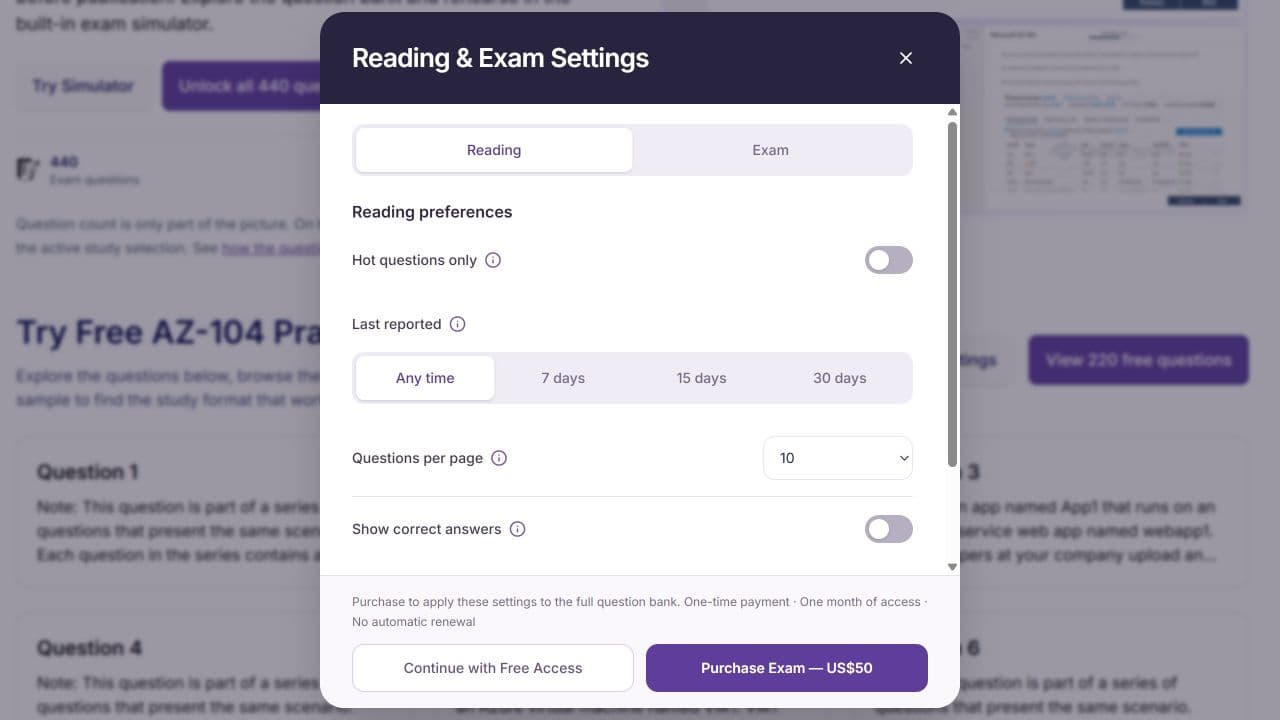
Current Reading preferences, captured on 10 November 2026. Hot questions only and the Last reported 7-, 15- and 30-day options select real-exam sightings. Applying these settings to the full bank requires purchased access.
If you are starting preparation
Begin with the official objectives and a small mixed sample. Write down which concepts you cannot explain. If every question in a narrow hot selection happens to cover a familiar topic, the selection will tell you little about the rest of your preparation.
An illustrative beginner task is: choose one objective, study the underlying concept, attempt a few relevant questions, and record what confused you. Expand across objectives before narrowing revision around activity signals. Use question-type filters to choose formats, and use the official guide and your notes to organise topics.
If you are halfway through
Combine a focused question selection with the gaps already in your notes. Use hot questions to find a manageable starting point, then add a task for an objective you have not practised recently. If a recent-activity view exposes a topic you do not recognise, check the official guide before expanding your plan.
For example, a learner comfortable with access management but weak on recovery should keep recovery in the next session even if the first hot questions are about permissions. Your personal gap takes priority over the convenience of the first result.
If the exam is approaching
Check new material and recent activity without discarding your established revision list. The useful question is “Does this expose a gap?” rather than “How can I complete every changing result?” Keep time for pacing practice and for objectives that still feel uncertain.
- Open the correct exam and check access.
- Start with one filter, so its effect is clear.
- Record the topic behind questions you cannot explain.
- Broaden the selection if it omits an unresolved objective.
- End with a specific next action in the revision worksheet.
Use the built-in exam simulator for a timed rehearsal after choosing what to review. Check the results and revisit your reasoning. A question appearing in a recent sitting does not guarantee that it will appear in yours.
Keep three signals separate
Hot-question activity helps prioritisation. Recent activity helps you inspect a time window. Your explanations and practical skills help you judge what to study next. Hot Exams are an exam-level classification that enables Hot Questions, recent-question filters and the inactivity rule. The status does not measure your readiness.
Find your certification and try a small selection with those distinctions in mind. Available controls vary by access and exam, so use the visible options rather than assuming every view has every filter.
For the complete source-to-publication process and the inactivity rule, read how our real exam questions are sourced and maintained.
Use your own mistakes alongside recent activity
Choose Previous mistakes and select the last 1, 2, 3, 4 or 5 completed Exam attempts for the same exam. Only questions with a selected, incorrect answer are included. Unanswered questions are excluded. Repeated questions appear once, and expired or unavailable questions are excluded from new retries. A completed Exam retry enters this five-attempt window; Practice retries do not.
On Hot Exams, questions unseen for more than 30 days become inactive and are excluded from reading and new simulator attempts. They remain in the database and return after a new sighting. If an exam no longer qualifies as hot, its inactivity flags are cleared. Historical attempt results remain available.
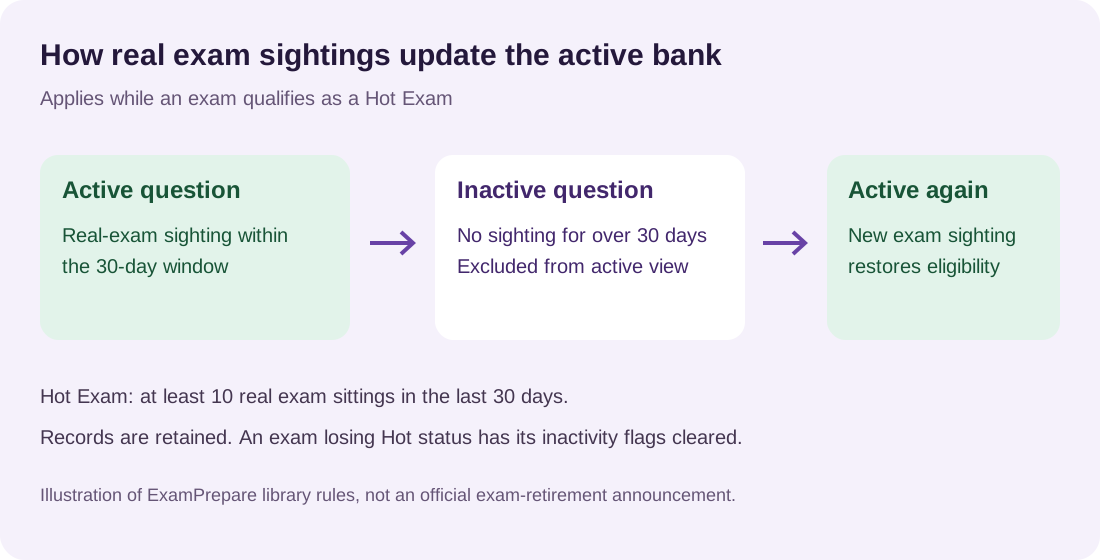
Updated illustration of the active-bank rule. Real-exam sightings determine recency on qualifying Hot Exams; inactive records remain stored and can return after a new sighting.
Editorial note: prepared with AI assistance using the documented filter rules. Examples describe suggested study choices, not predictions of exam content or results.