
Why Did My Practice Question Bank Get Smaller?
You open your practice library and the count is lower than you remember. Before assuming that something is missing, check whether you are looking at a different selection, different access, or an updated active library. Here is how to investigate the change and keep your revision on track.
- Written byExamPrepare Team
- Published on
First, check what the number counts
A library total, a free-access count and a filtered result describe different things. Comparing them can make a stable library look as though it has shrunk. Start on your exam overview, confirm the exam code, then open the question library. Check whether you are signed in to the account used for your purchase and whether your access is still active.
Next, look for an active range, hot-only selection, topic selection or recent-activity filter. Reset available filters before comparing counts. A smaller filtered selection means that fewer questions meet that selection; it does not establish that content was removed.
- Compare the same exam and access level.
- Compare the same filters and date window.
- Record when you checked: a maintained library can change between visits.
What inactive means in ExamPrepare
ExamPrepare distinguishes an active practice question from one marked inactive under its activity rule. The rule applies to qualifying Hot Exams: exams with at least 10 distinct recorded sessions during the previous 30 days. Within those exams, a question whose latest recorded activity is older than 30 days is marked inactive and excluded from the active library. When no later activity exists, the initial recorded date is used.
The underlying record is retained. A fresh recorded appearance can make the question active again. If an exam stops qualifying as a Hot Exam, its inactivity flags are cleared under the current rule. This is an activity-based selection policy, not a declaration by a certification vendor that a question has been retired.
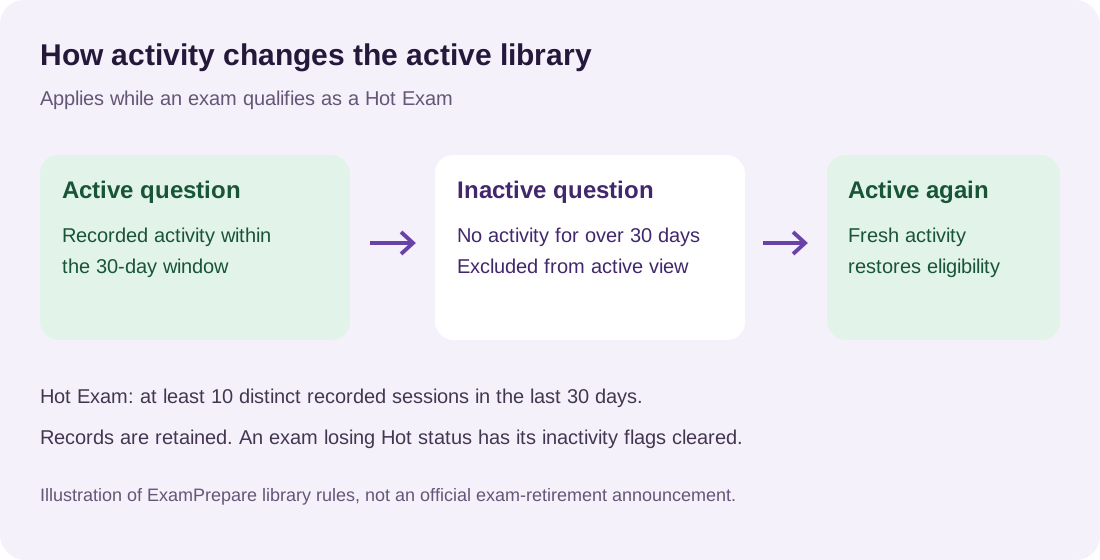
The diagram describes the library rule. It is not a forecast of the questions any candidate will receive.
A worked example without invented results
Imagine an exam that currently meets the Hot Exam threshold. Question A has recorded activity from four days ago. Question B has no activity for 35 days. Under the rule, A remains in the active set while B becomes inactive. If B is recorded again tomorrow, its activity status can change.
Those dates are illustrative. They do not describe an actual exam or a measured reduction in study time. The useful lesson is that library membership can change while the skill behind a question remains relevant to the published objectives.
For example, if a networking question leaves your active set, you should still study the networking objective if it remains in the vendor's guide. Use the library to organise practice; use the objectives to define the skills you need.
What to do with your existing notes
Keep notes that explain a reusable principle, show a practical task or correct a misunderstanding. Reconsider notes that contain only an answer letter or depend on an obsolete product version. Avoid deleting useful understanding merely because a question no longer appears in the same position.
Download the revision worksheet and add one row for a topic you were working on. Record the objective, what you can explain, the gap that remains and the next practical task. Question positions can change as the library changes, so record the topic and a question link where available.
Check the maintenance explanation yourself
Open the review methodology and read how expert review, reported activity and discussion serve different purposes. A reporting date is not an expert-review date, and daily monitoring does not promise daily additions to every exam.
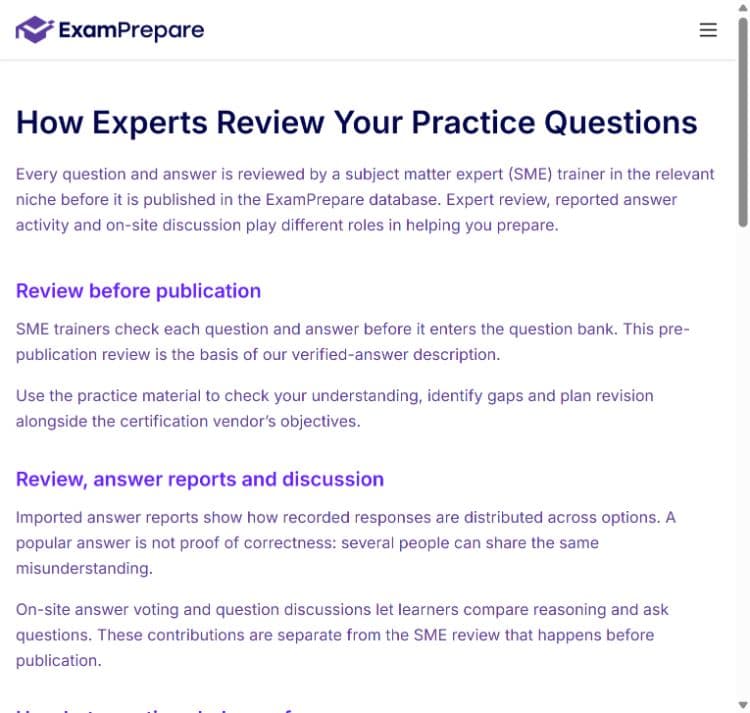
Actual ExamPrepare website screenshot, captured 24 October 2026. The page explains review before publication and the role of answer reports.
If an expected question appears inaccessible after you check filters and access, contact the team with the exam code, question link if available, your filters and the time you noticed the change. That gives support a specific issue to investigate.
Your next five minutes
Open your certification, check the current view, and choose one unresolved topic to revise. Finish by explaining the principle without looking at the answer. A useful session ends with a clearer understanding and a definite next step, even when the library count has changed.
Editorial note: prepared by the ExamPrepare editorial team with AI assistance, using the documented product behaviour. Examples are illustrative. Product controls and available formats vary by exam and access level.